Ưu đãi trong tuần: Nhập mã UD50 giảm 50k cho đơn từ 300k!
Trang chủ
Menu

Unreal Engine 5 - Gameplay Ability System - Top Down RPG

Unreal Engine 5 - Hệ thống Kỹ năng Gameplay - Top Down RPG

Unreal Engine 5 - Hệ thống Kỹ năng Gameplay - Top Down RPG

Xây dựng một game nhập vai nhiều người chơi với Hệ thống Kỹ năng Gameplay (GAS) của Unreal Engine!

4.8
(3,456 đánh giá)
27,186 học viên
Giảng viên
Stephen Ulibarri
Phụ đề Việt chất lượng cao Phụ đề tiếng Anh Bán chạy Đánh giá cao
99.000đ 1.779.000đ -94%
✓ Xem giỏ hàng và thanh toán
Bao gồm phụ đề tiếng Việt, tiếng Anh
106.0 giờ video
429 bài giảng
31 bài quiz
Truy cập vĩnh viễn
Học trên mọi thiết bị
Cập nhật: 07/06/2026

Bạn sẽ học được gì

Hệ thống Kỹ năng Gameplay của Unreal Engine
Cơ chế Gameplay Nhiều người chơi
Tạo ra một game nhập vai đầy đủ với Chiến đấu, Kinh nghiệm và Lên cấp, Kẻ địch, Phép thuật, Menu, Lưu game, và nhiều hơn nữa
Nguyên tắc lập trình SOLID và kiến trúc mã nguồn chất lượng AAA
Cách xác định mã nào nên viết trong Blueprints và mã nào nên viết trong C++ để tối ưu hiệu suất khi xuất bản game
Mã nguồn có khả năng mở rộng, linh hoạt, dễ bảo trì và dễ phát triển, có thể làm nền tảng cho bất kỳ game chuyên nghiệp nào
Tất cả các tính năng cốt lõi của Hệ thống Kỹ năng Gameplay
Công cụ và thực hành gỡ lỗi mã nguồn

Yêu cầu

Kiến thức về Ngôn ngữ Lập trình C++
Kiến thức cơ bản về Unreal Engine C++ - ít nhất đã từng tạo một dự án Unreal Engine C++

Đối tượng phù hợp

Những ai muốn biết cách kiến trúc một game có khả năng mở rộng và xuất bản được trong Unreal Engine
Những ai muốn biết cách triển khai Thuộc tính Gameplay, Kỹ năng, Kinh nghiệm, Lên cấp, và duy trì chúng trong một cơ sở mã nguồn sạch sẽ
Những ai muốn biết cách xử lý UI game cho các hệ thống phức tạp một cách hiệu quả
Những ai muốn tạo game RPG, MOBA, Bắn súng của riêng mình, hoặc bất kỳ loại game nào liên quan đến thuộc tính, kỹ năng, phép thuật, hoặc các cơ chế tùy chỉnh khác
Những ai muốn biết cách triển khai AI kẻ địch với Behavior Trees và Environment Queries (EQS)
Những ai đã có kinh nghiệm với Unreal Engine và muốn mở rộng kỹ năng để tạo ra những game có thể xuất bản
Những ai đang tìm kiếm một khóa học toàn diện về Hệ thống Kỹ năng Gameplay (GAS) để có thể sử dụng nó trong các dự án game của riêng mình
Cả những người đam mê và nhà phát triển game chuyên nghiệp đều sẽ được hưởng lợi từ khóa học này
Các nhà phát triển AAA cần học các kiến thức cơ bản về GAS cho dự án game của nhóm mình
Trưởng nhóm dự án phát triển game cần hiểu cách GAS hoạt động trong Unreal Engine, khả năng, giới hạn và chi phí thời gian, công sức cho nhà phát triển
Các nhóm cần kiến trúc dự án game một cách có khả năng mở rộng, để dễ bảo trì sau khi ra mắt
Bất kỳ ai đã tạo một số dự án Unreal Engine cơ bản và sẵn sàng bước lên một tầm cao mới!

Nội dung khóa học

33 phần • 428 bài giảng
1 Giới thiệu
1 Jetbrains Rider - Hiện Miễn phí cho Mục đích Phi Thương mại!
2 Tạo Dự án
3 Thiết lập Kiểm soát Phiên bản (Tùy chọn)
4 Lớp Nhân vật Cơ sở
5 Nhân vật Người chơi và Kẻ địch
6 Thiết lập Blueprint Nhân vật
7 Animation Blueprints
8 Enhanced Input
9 Aura Player Controller
10 Đầu vào Di chuyển
11 Game Mode
12 Giao diện Kẻ địch
13 Làm nổi bật Kẻ địch
14 Làm nổi bật với Post Process
1 Hệ thống Kỹ năng Gameplay
2 Các Thành phần Chính của GAS
3 Player State
4 Ability System Component và Attribute Set
5 GAS trong Chế độ Nhiều người chơi
6 Xây dựng ASC và AS
7 Chế độ Replication Mode
8 Init Ability Actor Info
1 Thuộc tính
2 Máu và Năng lượng
3 Các Phương thức Truy cập Thuộc tính
4 Effect Actor
1 Kiến trúc UI Game
2 Aura User Widget và Widget Controller
3 Thanh Tiến trình Hình cầu
4 Hình cầu Máu
5 Aura HUD
6 Overlay Widget Controller
7 Phát Giá trị Ban đầu
8 Lắng nghe Thay đổi Thuộc tính
9 Callback cho Thay đổi Năng lượng
1 Gameplay Effects
2 Cải thiện Effect Actor
3 Instant Gameplay Effects
4 Duration Gameplay Effects
5 Periodic Gameplay Effects
6 Effect Stacking
7 Infinite Gameplay Effects
8 Chính sách Áp dụng Instant và Duration
9 Áp dụng và Loại bỏ Infinite Effect
10 PreAttributeChange
11 PostGameplayEffectExecute
12 Curve Tables cho Scalable Floats
1 Gameplay Tags
2 Tạo Gameplay Tags trong Editor
3 Tạo Gameplay Tags từ Data Tables
4 Thêm Gameplay Tags vào Gameplay Effects
5 Áp dụng Gameplay Tags với Effects
6 Gameplay Effect Delegates
7 Get All Asset Tags
8 Phát Gameplay Tags của Effect
9 UI Widget Data Table
10 Lấy Hàng từ Data Tables
11 Phát Các Hàng của Data Table
12 Message Widget
13 Tạo Hoạt ảnh cho Message Widget
14 Thay thế Callback bằng Lambda
15 Ghost Globe
16 Giới hạn Thuộc tính đúng cách
1 Khởi tạo Thuộc tính từ Data Table
2 Khởi tạo Thuộc tính với Gameplay Effects
3 Attribute Based Modifiers
4 Thứ tự Xử lý Modifier
5 Hệ số Modifier
6 Thuộc tính Phụ
7 Thuộc tính Dẫn xuất
8 Tính toán Tùy chỉnh
9 Cấp độ Người chơi và Giao diện Chiến đấu
10 Modifier Magnitude Calculations
11 Khởi tạo Thuộc tính Quan trọng
1 Menu Thuộc tính - Kế hoạch
2 Menu Thuộc tính - Framed Value
3 Menu Thuộc tính - Text Value Row
4 Menu Thuộc tính - Text Value Button Row
5 Menu Thuộc tính - Xây dựng
6 Button Widget
7 Wide Button Widget
8 Mở Menu Thuộc tính
9 Đóng Menu Thuộc tính
10 Kế hoạch Hiển thị Dữ liệu Thuộc tính
11 Gameplay Tags Singleton
12 Aura Asset Manager
13 Native Gameplay Tags
14 Attribute Info Data Asset
15 Attribute Menu Widget Controller
16 Aura Ability System Blueprint Library
17 Xây dựng Attribute Menu Widget Controller
18 Attribute Info Delegate
19 Widget Attribute Tags
20 Ánh xạ Tags tới Thuộc tính
21 Phản hồi Thay đổi Thuộc tính
1 Gameplay Abilities
2 Cấp Kỹ năng
3 Thiết lập trên Gameplay Abilities
4 Input Config Data Asset
5 Aura Input Component
6 Callback cho Đầu vào Kỹ năng
7 Kích hoạt Kỹ năng
8 Click để Di chuyển
9 Thiết lập Click để Di chuyển
10 Thiết lập Tự động Chạy
11 Triển khai Tự động Chạy
12 Dọn dẹp Mã nguồn
13 Aura Projectile
14 Phép thuật Aura Projectile
15 Sinh Projectile
1 Ability Tasks
2 Gửi Gameplay Events
3 Sinh FireBolt từ Event
4 Custom Ability Tasks
5 Target Data
6 Gửi Dữ liệu Con trỏ Chuột
7 Nhận Target Data
8 Dự đoán trong GAS
9 Định hướng Projectile
10 Motion Warping
11 Tác động của Projectile
12 Projectile Collision Channel
13 Gameplay Effect của Projectile
14 Thanh Máu Kẻ địch
15 Ghost Bar
1 Lớp Nhân vật RPG
2 Character Class Info
3 Default Attribute Effects
4 Curve Tables - CSV và JSON
5 Khởi tạo Thuộc tính Kẻ địch
1 Meta Attributes
2 Meta Attribute Sát thương
3 Set By Caller Magnitude
4 Sát thương Kỹ năng
5 Kẻ địch Phản ứng Bị đòn
6 Kích hoạt Kỹ năng Phản ứng Bị đòn của Kẻ địch
7 Kẻ địch Chết
8 Hiệu ứng Tan biến
9 Floating Text Widget
10 Hiển thị Chữ Sát thương
11 Execution Calculations
12 Damage Execution Calculation
13 ExecCalcs - Thu thập Thuộc tính
14 Triển khai Block Chance
15 Triển khai Armor và Armor Penetration
16 Hệ số Tính toán Sát thương
17 Triển khai Critical Hits
1 Gameplay Effect Context
2 Custom Gameplay Effect Context
3 NetSerialize
4 Triển khai Net Serialize
5 Struct Ops Type Traits
6 Aura Ability System Globals
7 Sử dụng Custom Effect Context
8 Màu Chữ Nổi
9 Thông báo Bị đòn
10 Loại Sát thương
11 Ánh xạ Loại Sát thương tới Kháng
12 Thuộc tính Kháng
13 Giảm Sát thương Kháng
14 Kiểm tra Nhiều người chơi
1 Thiết lập AI cho kẻ địch
2 AI Controller, Blackboard và Behavior Tree
3 Service trong Behavior Tree
4 Các key trong Blackboard
5 Tìm người chơi gần nhất
6 AI và các Effect Actor
7 Decorator trong Behavior Tree
8 Task tấn công trong Behavior Tree
9 Tìm vị trí mới xung quanh mục tiêu
10 Hệ thống truy vấn môi trường (EQS)
11 Truy vấn môi trường
12 Các bài kiểm tra trong EQS
13 Kiểm tra khoảng cách
14 Sử dụng truy vấn EQS trong Behavior Tree
1 Kỹ năng đánh cận chiến
2 Animation Montage tấn công
3 Mục tiêu chiến đấu
4 Gameplay Event cho đòn cận chiến
5 Lấy danh sách người chơi còn sống trong phạm vi
6 Gây sát thương cận chiến
7 Kiểm tra đòn cận chiến ở chế độ nhiều người chơi
8 Gameplay Tag trên Montage
9 Montage có gắn thẻ
10 Multiple Socket tấn công
11 Kẻ địch Ghoul
12 Montage tấn công của Ghoul
13 Hoàn thiện đòn cận chiến
1 Tấn công tầm xa
2 Đạn đá (Rock Projectile)
3 Đường cong sát thương tầm xa
4 Cấp kỹ năng tấn công tầm xa
5 Montage tấn công bằng ná cao su
6 Phát Montage tấn công tầm xa
7 Sinh ra đạn đá
8 Animation Blueprint cho ná cao su
9 Montage tấn công bằng ná cao su
1 Goblin Shaman
2 Montage tấn công của Shaman
3 Kỹ năng tấn công của Shaman
4 Key Dead trong Blackboard
5 Kiểm tra kẻ địch ở chế độ nhiều người chơi
1 Goblin Spear - Sound Notifies
2 Hiệu ứng va chạm
3 Gameplay Cue khi va chạm cận chiến
4 Tag trên Montage và Socket
5 Goblin Spear - Âm thanh bị thương và chết
6 Goblin Slingshot - Sound Notifies
7 Hiệu ứng va chạm của đá
8 Goblin Shaman - Sound Notifies
9 Ghoul - Sound Notifies
10 Ghoul - Vệt quệt tay
11 Blueprint của Demon
12 Đòn cận chiến của Demon
13 Đòn tầm xa của Demon
14 Demon - Sound Notifies
15 Demon - Hiệu ứng tan biến
16 Vị trí triệu hồi của Shaman
17 Thời gian triệu hồi bất đồng bộ
18 Hiệu ứng hạt triệu hồi
19 Chọn lớp lính ngẫu nhiên
20 Montage triệu hồi lính
21 Số lượng lính
22 Behavior Tree của Elementalist
23 Task tấn công của Elementalist
24 Giảm số lượng lính
25 Thêm hiệu ứng mượt với Tweening
26 Hoàn thiện kẻ địch
1 Ánh sáng và hậu kỳ của Level
2 Texture Streaming Pool vượt ngân sách
3 Flame Pillar Actor
4 Fade Actor
5 Làm mờ các vật thể chắn
1 Widget Máu, Mana và Phép thuật
2 Quả cầu phép thuật (Spell Globe)
3 Thêm Spell Globe
4 Thanh kinh nghiệm (XP)
5 Data Asset thông tin kỹ năng
6 Khởi tạo Overlay với các kỹ năng ban đầu
7 Delegate cho từng kỹ năng
8 Gắn sự kiện Widget vào Delegate thông tin kỹ năng
9 Chi phí Gameplay Ability
10 Thời gian hồi chiêu Gameplay Ability
11 Async Task hồi chiêu
12 Thẻ hồi chiêu trong thông tin kỹ năng
13 Hiển thị thời gian hồi chiêu trên HUD
14 Chế độ Modeling
1 Kinh nghiệm và lên cấp
2 Data Asset thông tin lên cấp
3 Thêm XP vào Player State
4 Lắng nghe thay đổi XP
5 Kế hoạch thưởng XP
6 Thưởng XP cho kẻ địch
7 Meta Attribute XP nhận được
8 Lắng nghe sự kiện thụ động
9 Gửi sự kiện XP
10 Hiển thị XP trên HUD
11 Hàm Interface khi lên cấp
12 Lên cấp
13 Hiển thị cấp độ trên HUD
14 Hệ thống Niagara khi lên cấp
15 Thông báo lên cấp trên HUD
1 Biến thành viên Attribute Points
2 Hiển thị điểm chỉ số trên HUD
3 Nút nâng cấp chỉ số
4 Nâng cấp chỉ số
5 Bổ sung đầy đủ năng lượng
6 Hoàn thiện menu chỉ số
1 Thiết kế menu phép thuật
2 Nút Spell Globe
3 Cây phép tấn công (Offensive Spell Tree)
4 Cây phép bị động (Passive Spell Tree)
5 Hàng phép đã trang bị
6 Widget menu phép thuật
7 Khung mô tả phép
8 Nút trong menu phép thuật
9 Controller của Widget menu phép thuật
10 Xây dựng Controller cho Widget menu phép thuật
11 Nút hàng phép đã trang bị
12 Trạng thái và loại kỹ năng
13 Hiển thị kỹ năng trong cây phép
14 Yêu cầu cấp độ kỹ năng
15 Cập nhật trạng thái kỹ năng
16 Cập nhật trạng thái trong menu phép
17 Hiển thị điểm phép thuật
18 Chọn biểu tượng
19 Bỏ chọn biểu tượng
20 Các nút trong menu phép
21 Kỹ năng được chọn
22 Sử dụng điểm phép
23 Rich Text Block (khối văn bản đa dạng)
24 Mô tả phép thuật
25 Mô tả FireBolt
26 Chi phí và hồi chiêu trong mô tả phép
27 Tự động bỏ chọn
28 Animation cho hàng phép đã trang bị
29 Loại kỹ năng
30 Trang bị kỹ năng
31 Cập nhật Overlay khi trang bị kỹ năng
32 Globe được gán lại
33 Hủy gán Delegate
1 Thẻ Debuff
2 Tham số Debuff
3 Struct tham số hiệu ứng sát thương
4 Sử dụng Damage Effect Params
5 Xác định Debuff
6 Thông tin Debuff trong Effect Context
7 Debuff trong Attribute Set
8 Dynamic Gameplay Effect (hiệu ứng động)
9 Niagara Component cho Debuff
10 Độ lớn xung lực khi chết (Death Impulse)
11 Xung lực chết trong Effect Context
12 Xử lý xung lực chết
13 Đánh bật lùi (Knockback)
1 Phân tán đạn FireBolt
2 Sinh ra nhiều đạn
3 Đạn tự dẫn đường (Homing Projectile)
4 Hệ thống Niagara khi nhấp chuột
5 Gọi sự kiện đã sao chép (Replicated Event)
6 Phép Aura Beam
7 Montage Electrocute
8 Block Tag của người chơi
9 Đường dẫn GameplayCue Notify
10 Gameplay Cue Notify Actor
11 Âm thanh lặp cho Electrocute
12 Target Trace Channel
13 Mục tiêu dò đầu tiên
14 Mục tiêu bổ sung
15 Cue vòng lặp sốc trên mục tiêu bổ sung
16 Chi phí, hồi chiêu và sát thương của Electrocute
17 Áp dụng chi phí và sát thương Electrocute
18 Hoàn thiện Electrocute
19 Nổ tung mấy quả FireBolt
20 Choáng (Stun)
21 Hệ thống Niagara cho Stun
22 Animation vòng lặp sốc
1 Tag của phép bị động
2 Kỹ năng hào quang bị động
3 Thông tin kỹ năng bị động
4 Tag bị động trong cây phép
5 Nhiều phần thưởng khi lên cấp
6 Kích hoạt kỹ năng bị động
7 Niagara Component cho kỹ năng bị động
1 Vòng tròn ma thuật (Magic Circle)
2 Sinh ra vòng tròn ma thuật
3 Hàm Interface của vòng tròn ma thuật
4 Phép Arcane Shards
5 Chờ Nhấn Nút Đầu Vào
6 Khử Răng Cưa và Decal Di Chuyển
7 Thu Thập Điểm
8 Vị Trí Điểm Bất Đồng Bộ
9 Gameplay Cue Notify Bùng Nổ
10 Montage Mảnh Vỡ Huyền Bí
11 Tham Số Sát Thương Vùng
12 Thiết Lập Tham Số Sát Thương Vùng
13 Sát Thương Vùng Có Suy Giảm
14 Tổng Hợp Sát Thương Vùng
15 Bỏ Qua Kẻ Địch Khi Vòng Tròn Ma Thuật Đang Hoạt Động
16 Ghi Đè Lực Đẩy Lùi và Xung Lực Chết
17 Mô Tả Phép
18 Chi Phí và Hồi Chiêu Mảnh Vỡ Huyền Bí
1 Kỹ Năng Hỏa Cầu
2 Chi Phí và Hồi Chiêu Hỏa Cầu
3 Hỏa Cầu Hào Quang
4 Tạo Hỏa Cầu
5 Dòng Thời Gian Hỏa Cầu
6 Gây Sát Thương Hỏa Cầu
7 Sát Thương Nổ Hỏa Cầu
8 Kết Cấu Hồi Chiêu Trống
9 Thực Thi Gameplay Cue Cục Bộ
1 Lưu Tiến Trình
2 Menu Chính
3 Nút Chơi và Thoát
4 Ô Lưu Trống
5 Ô Lưu Nhập Tên
6 Ô Lưu Đã Có Dữ Liệu
7 Menu Tải
8 MVVM
9 Thay Đổi Cần Thiết Cho Phiên Bản 5.3+
10 Lớp View Model
11 Xây Dựng View Model
12 View Model Ô Lưu
13 Chuyển Đổi Widget Switcher
14 Đối Tượng Lưu Game
15 Gắn Biến Vào ViewModel
16 Trạng Thái Ô Lưu
17 Bật Nút Chọn Ô
18 Bật Nút Chơi và Xóa
19 Widget Bạn Có Chắc Không
20 Xóa Ô Lưu
21 Thông Báo Trường Tên Bản Đồ
22 Lưu Tên Bản Đồ
23 Di Chuyển Đến Bản Đồ Đã Lưu
1 Chọn Điểm Bắt Đầu Người Chơi
2 Đặt Điểm Bắt Đầu Người Chơi Mặc Định
3 Lưu Tag Điểm Bắt Đầu Người Chơi
4 Điểm Kiểm Tra
5 Hàm Giao Diện Cho Việc Lưu Tiến Trình
6 Lưu Dữ Liệu Người Chơi
7 Tải Dữ Liệu Người Chơi
8 Khởi Tạo Thuộc Tính Từ Ổ Cứng
9 Hiển Thị Cấp Độ Người Chơi Trong Màn Hình Tải
10 Lưu Kỹ Năng
11 Ghi Chú Về Bài Học Này
12 Tải Kỹ Năng
13 Cấu Trúc Dữ Liệu Cho Việc Lưu Dữ Liệu
14 Lưu Trạng Thái Thế Giới
15 Tải Trạng Thái Thế Giới
1 Màu Sắc Tô Sáng Khác Nhau
2 Giao Diện Tô Sáng
3 Trạng Thái Nhắm Mục Tiêu
4 Tô Sáng Kẻ Không Phải Địch
5 Đặt Vị Trí Di Chuyển Đến
6 Đèn Hiệu
7 Lối Vào Bản Đồ
8 Lối Vào Cầu Thang Hầm Ngục
9 Blueprint Lối Vào Hầm Ngục
10 Menu Chỉnh Sửa
11 Khối Lượng Sinh Sản
12 Cái Chết Người Chơi
13 Cấp Bậc Chiến Lợi Phẩm
14 Hiệu Ứng Chiến Lợi Phẩm
15 Đường Cong Rơi Chiến Lợi Phẩm
16 Âm Thanh Nhặt Đồ
17 Nút Thoát
1 Nhiệm Vụ - Cấp Độ
2 Kết Luận - Video Bổ Sung

Giới thiệu khóa học

This is the most comprehensive Unreal Engine course available. If you want to learn how to architect a fully-functional RPG game, this course will give you the ability to do so with an expandable code base, architected with AAA quality code. If you've ever wondered where to draw the line between C++ and Blueprints, this is the course for you. If you've ever wanted to create an RPG complete with a stats system, abilities, leveling up, spells, attributes, menus, all while keeping your code base clean and following best practices, this is the course for you. If you want to step up your Unreal Engine development capabilities and better understand the inner workings of the engine, this course is for you. If you have plans to make your own serious game with interconnecting systems, involving attributes, abilities, level ups, enemies and AI, and coded for multiplayer, this is the course for you!

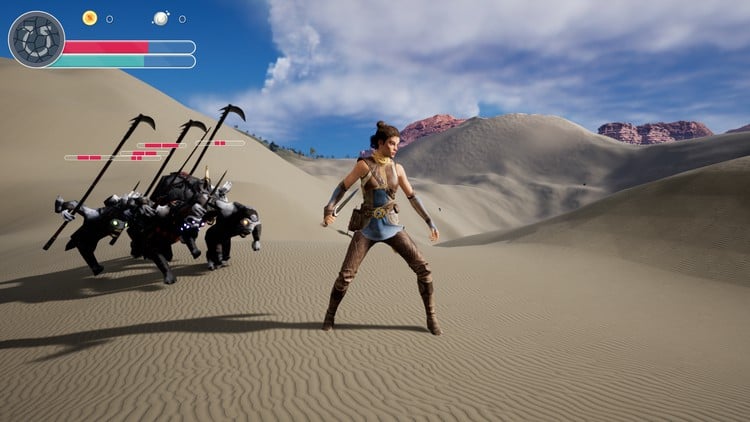
In this course, we will create a top-down RPG style game, filled with systems architected using Unreal Engine's built-in Gameplay Ability System (GAS). This is where you will learn how to architect a shipped game, and code it expertly so it can be easily expanded, upgraded, and maintained. We follow SOLID coding principles, and balance the Blueprint/C++ ratio in a way that AAA shipped games do, such as Fortnite. My experience with AAA shipped game code, as well as consultations with industry veteran developers has allowed me to reveal to you the way a real shipped game's code base looks like. If you've ever wondered how much of a game can be kept in Blueprint versus C++, look no further. This course is the answer.

NOTE: This course involves programming in C++, which involves the use of an Integrated Development Environment (IDE) such as Visual Studio, Rider, or VSCode. The IDE used in this course by me will be Rider, but this IDE is not a requirement for students to follow the course. You can use any IDE of your choice.

The assets in this game project were made specifically for this course, and will be provided in an asset pack. This includes:

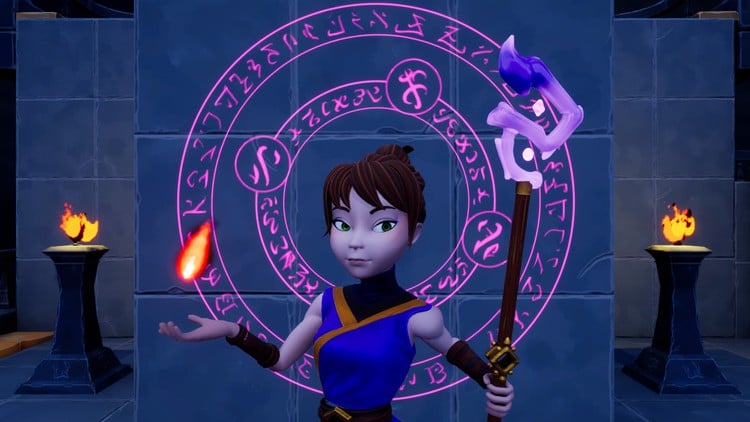
  • Characters, including Aura, the main character, as well as enemy characters including Goblin Warriors, Goblin Rangers, a Goblin Shaman, Red and Black Demons, the Ghoul, and a Shroom.

  • A modular dungeon pack that can be pieced together to make basic dungeons

  • A waypoint shrine and obelisks

  • Particle Niagara System Effects, including explosions, level up effects, slingshot rocks, hit impacts, electricity beams, fireballs, fire bolts, flames, stars for stun effects, and more!

  • Sound effects for enemies, footsteps, spells, and more!

  • Textures for the HUD, including high-quality buttons, frames, dynamically-animated spell globes, progress bars, XP bar, and more!

  • Full animation sets for Aura and all enemies

  • Much more!

In this course, we will be covering the following topics:

  • Setting up a Top-Down Project from scratch

  • Enemy and item selection with outline effects

  • Proper use of OOP and inheritance to create a character class hierarchy

  • Intro to the Gameplay Ability System and the core classes that comprise it

  • Custom Gameplay Ability System Components and Attribute Sets, and how to replicate Attributes

  • All important settings for all GAS classes and components

  • How to use Attributes for player stats, including Primary Attributes:

    • Strength (increases physical damage)

    • Intelligence (increases magical damage)

    • Resilience (increases Armor and Armor Penetration)

    • Vigor (increases Max Health)

  • Secondary Attributes, based off of primary attributes and other custom variables:

    • Armor (reduces damage taken, improves Block Chance)

    • Armor Penetration (ignores percentage of enemy Armor, increases Critical Hit Chance)

    • Block Chance (change to cut incoming damage in half)

    • Critical Hit Chance (chance to double damage plus critical hit bonus)

    • Critical Hit Damage (bonus damage added when a critical hit is scored)

    • Critical Hit Resistance (reduces critical hit chance of attacking enemies)

    • Health Regeneration (amount of Health restored every 1 second)

    • Mana Regeneration (amount of Mana restored every 1 second)

    • Max Health (maximum amount of Health obtainable)

    • Max Mana (maximum amount of Mana obtainable)

  • Vital Attributes - things like Health and Mana, which are dependent on all the other attributes

  • Gameplay Effects - classes in the GAS system used to apply changes to attributes

  • Gameplay Tags - an essential part of GAS, which allows us to identify qualities, attributes, abilities, character classes, and any other thing we can imagine

  • Game UI - how to handle complex UI in an RPG game efficiently, in an organized, modular, and scalable manner. We cover different UI paradigms, from MVC (Model View Controller) and MVVM (Model View ViewModel, using Unreal Engine's new ViewModel feature)

  • Full Attribute and Spell Menus, with upgrade abilities, spell trees, locked spell levels, spell upgrades by ability level, and more

  • Attributes - how to use Gameplay Attributes to represent player stats, and incorporate them into the gameplay mechanics by creating an Effect Application pipeline, allowing for calculations and results caused by phenomena in the game, such as combat damage

  • Gameplay Abilities - the heart of GAS. We create all manner of types of gameplay abilities to handle the casting of spells, handling important capabilities of the player character and enemy AI, and how to configure different abilities to suit your needs.

  • Different RPG Classes - we implement different character RPG classes including the Ranger, Warrior, and Elementalist, and do so in an easily-scalable manner so you can have any number of character class types in your game

  • Damage and Combat - we implement a full RPG style combat system with different damage types, damage resistances, and debuffs corresponding to damage types, and encode these calculations into our damage pipeline. All attributes, damage types, resistances and debuffs are functional in this game.

  • All combat mechanics are displayed in some form of visual feedback to the player. This includes floating text for damage, changing color based on custom criteria, floating text to inform of critical hits, blocked hits, and critical blocked hits. We also implement knockback and stun mechanics in response to lightning damage, incapacitating the character/enemy, as well as fire debuffs, where characters are set ablaze and take fire damage while burning.

  • Enemy AI - We implement the enemy behavior using Unreal Engine Behavior Trees and the Environment Query system (EQS) to provide customized behavior for the Ranged, Warrior, and Elementalist enemy types.

  • Enemies can cast spells and summon AI minions

  • Fading geometry when it gets in the way of the camera for a top-down game

  • Ability Cost and Cooldown (spells spend Attribute resources - in this game, spells cost Mana)

  • Fully functional HUD with Equipped Spells, displaying spell cooldown timers, and experience (XP)

  • The ability to assign Abilities to different inputs in the spell menu (assign FireBolt to the 1 key and Electrocute to the Left Mouse Button, swap them back, etc.)

  • Experience and Level-Up System - We craft an experience system, awarding XP for eliminating enemies, and leveling up when reaching XP thresholds for various abilities. XP and Level are displayed in the HUD, and Level Up messages and effects are as well. Leveling up is associated with gaining Attribute Points and Spell Points, which can be used to upgrade Attributes and Spell abilities in the Attribute and Spell Menus respectively, as well as topping off Health and Mana upon Leveling Up. (Basically, you will see enough examples of how to use this system that you'll be able to expand it with any functionality you want for your own games)

  • Passive Spells - Spells that you can equip which remain active while they are equipped.

  • A variety of Offensive Spells, showcasing different examples and features of GAS, including FireBolt, Electrocute, Arcane Shards, and FireBlast.

  • Saving Progress and Level Transitions

  • Intermediate/Advanced Unreal Engine topics, including custom Async Tasks, Ability Tasks, Blueprint Function Libraries, Asset Managers, Singletons (and why these are only good for a VERY select few cases), custom Gameplay Effect Contexts, Net Serialization, Struct Ops Type Traits, C++ Lambdas, game mechanics algorithms, and oh, so much more.

  • How to choose which functionality should go into C++ versus Blueprint - This is one of the most valuable lessons, and is taught all throughout the course. Students often ask me "which functionality should go in C++ versus in Blueprint?" This course is my answer. This is a serious-scale project foundation with over 100 hours of video, and no filler. The project is architected with approximately 50% Blueprints and 50% C++. I show you which functionality should be on the C++ side, which functionality is more appropriate for Blueprints, and why.

  • SOLID Coding Principles and code architecture - We keep our code base clean in this project. Another question I often get is "Is this best coding practice?" This course is my answer to this question. This is an example of code you would see in a AAA game, shipped to millions of players. Maintaining clean and modular code is essential to a serious game project that needs to be scalable, expandable, modular, maintainable, testable, performant, and efficient. This course will show you how.

This is not a beginner course. I expect you to already understand the C++ programming language and have at least created one Unreal Engine C++ project.

This course is my best course yet, and I'm very proud to bring you the Unreal Engine 5 - Gameplay Ability System - Top Down RPG course, the result of nearly a year of painstaking development, research, consultation with professionals, and asset creation. After taking this course, you will understand Unreal Engine far better than the average developer, and you'll be empowered to create your own well-architected projects, large and small, and you'll bring value to your team, your company, your solo venture, and anyone/anything else you grace with your skillset.

Join the course, and invest in the biggest leap of your game development career.

Stephen Ulibarri, founder of the Druid Mechanics Game Developer Community

This course project is created in Unreal Engine version 5.2. Updates are periodically added to ensure compatibility with newer engine versions.

Khóa học liên quan

Khám phá thêm các khoá học cùng chủ đề

Hiển thị tất cả khoá học C Plus Plus
Hiển thị tất cả khoá học Game Development
Hiển thị tất cả khoá học Gameplay Ability System
Hiển thị tất cả khoá học Unreal Engine
Zalo
Tôi có thể tư vấn khoá học cho bạn 😊