Okay guys, this is a course
In Blender
for 3d character creation
Even two of them
And it is THE BEST course of its type in the world!
Really?
Okay okay, one of the best at least.But it is a course with no speedups, all in real time, from scratch, with constant explaining and narration by me. And probably you will ask "But Niko, who are you"? And you will be right to do so.
I am Niko, and i am a working 3D character artist with more than 15 years of experience in the game industry. I also have more than 15 thousand students on all of my online courses for Zbrush, Blender, 3D character creation and male and female anatomy. And obviously, a youtube channel with more than 50 thousand subscribers.
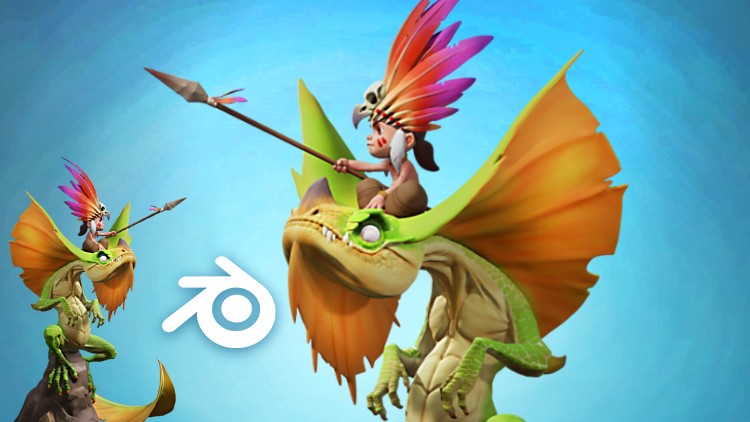
In this course, for intermediate Blender users, we will do this characters, concept by the great artist Tooth Wu, completely and only in Blender. We will talk about lots of things that can affect the mind of a 3D character artist while sculpting, modelling, coloring and rendering.
We will start with making the dragon head, making sure we follow the concept closely. Then we will make the dragons body, arms and legs. We will of course, make the very important dragon wings, or membrains. After that will be a time to start making the rider. We will start with his head, then his body and arms, and continue with the magnificient feather crown which is the crown jewel of the the whole piece :). Following we will sculpt the dragon tail and model the spear of the boy.
After we do some refinements we will start the scariest part of the sculpt - the scales. We will do them carefully to not hurt the poor dragon. During this colosal task i will talk about alot of thins, so you will never be bored (hopefully) :).
Then will be time for long rest and spend time with your loved ones in a tropical island...No! In reality we will have to continue with coloring the dragon, which we will do with great honour, and some interesting brushes and techniques. Using those techniques we will then color the boy and his accessories too. We will spend some time to work on the rock, since it is also an important part of the whole model.
Then it will be time to pose the dragon and fix some problems. After that we will easily rig and pose the boy's arms and fingers matching the concept. And at the end we will add some lights and i will explain how you can achieve a nice render of your models with even a turntable video with transparent background.
I know all this sounds too good to be truth. But it obviously is true. So for your own good, i hope you will find inspiration in this promo video, which will be the fuel you need to start making this characters in Blender, with, or without my help.
It is an intermediate Blender course, so if you are indeed inspired, but you havent touched Blender before, i will suggest my Absolute beginners 3D character in Blender course, which will fill up the gap between absolute novice Blender user and the level needed for this dragon rider course.
But either way i hope you have a blast with the over 16 hours of video content in this course and i will be glad to see your results after you finish it :).
Lets do this! Together.