Are you looking to master the art of 3D modelling with Blender?
Look no further than our ‘Blender Beginner’s Bootcamp’, where we'll take you through every step of the process of creating 20 projects spanning a wide range of topics, ensuring that you leave this course with a wealth of knowledge and the confidence to tackle the world of 3D modelling head-on.
Our approach is designed to cater to both complete beginners and those with some experience in 3D modelling, so no matter your skill level, you'll find this course challenging and rewarding.
Introduction
Whether you're looking to pursue a career in the field or simply want to create stunning 3D assets as a hobby, ‘Blender Beginner’s Bootcamp’ is the perfect starting point. Our course is perfect for beginners and intermediate 3D modellers looking to advance their skills.
Blender is a free and open-source 3D creation software that's used for everything from creating video game assets to producing films and animations. With Blender, you can create highly-detailed and realistic 3D models, including characters, environments, and products. Blender also offers an extensive range of tools and techniques, making it versatile software for 3D modelling and animation.
We provide a comprehensive download pack and Blender files, so you can dive right into the learning experience without any hassle. In this course, you'll learn a variety of techniques and tools, from basic modelling techniques to advanced array systems, modifiers, and particle systems.
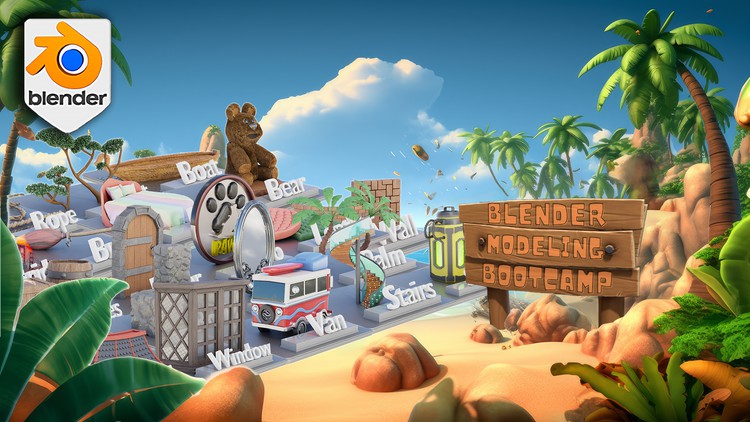
You'll create stunning 3D assets, such as:
· Japanese-style roofs
· Spiral staircases
· Camper vans
· Boats
· Palm trees
· Bay windows
· Leather couches
We'll also teach you how to create realistic textures, materials, and lighting, giving your models added depth and realism.
This course will teach you everything you need to know about creating stunning projects in Blender in just over 12 hours of 3D games art and design.
Our ‘Blender Beginner’s Bootcamp’ top 8 points:
1. Dive into advanced modelling techniques to design intricate vehicles & sci-fi props
2. Build unique houses, constructing wells, stairs, and windows with personalised elements
3. Bring your imagination to life by modelling traditional parts for captivating fantasy settings
4. Enhance your environments with realistic and stylized foliage for immersive environments
5. Utilise physics simulations and generators to populate your scene with intricate and dynamic elements
6. Develop structurally sound bridges and boats to perk up your aquatic settings
7. Learn 3D modelling fundamentals, gradually advancing your skills with PBR textures using the free material pack
8. From magical brooms to fluffy plushies, transform 2D logos into 3D projects with confidence
Your project will be to experiment with the 20 different Blender bootcamp projects following our course lessons. From learning how to create roofs, a spiral staircase, palm trees, and furniture, this course comes with a project for everyone. Of course, you could set yourself a challenge and diversify aspects or details of each project such as using assets you already have from your other projects and setting up a scene for you to render. You could change the complexity of the assets we will create in ‘Blender Beginner’s Bootcamp’ to make your scenes more alive as your skills increase.
Course Overview
Are you ready to take your 3D modelling skills to the next level?
Our ‘Blender Beginner’s Bootcamp’ has been meticulously designed to cater to both complete beginners and those with some experience in 3D modelling, ensuring that you leave this course with a wealth of knowledge and the confidence to tackle the world of 3D modelling head-on.
We'll teach you the fundamentals of Blender, including how to navigate the interface, use modelling tools, and apply textures and materials. ‘Blender Beginner’s Bootcamp’ allows you the flexibility to choose specific projects or work your way through all the projects sequentially.
Part 1: Bridge and Supports
In this section, we'll cover the basics of modelling, starting with a simple bridge project. You'll learn essential modelling techniques, such as extrusion, loop cuts, and proportional editing, and get an introduction to Blender modifiers like the mirror and array modifiers.
You'll also discover how to create realistic bridge supports, giving you a solid foundation to build upon throughout the course.
Part 2: Japanese Style Roof - Curved Arrays and Traditional Architecture
Discover the power of array systems as you create intricate, curved roofs in the traditional Japanese style.
You'll learn how to use the curve modifier to bend your roofs and explore various techniques to create detailed and authentic Japanese roof tiles and ornaments. By the end of this module, you'll be able to design and create stunning Japanese-style buildings.
Part 3: Doors
In section 3, you'll learn modelling techniques for creating doors, including how to create realistic wooden panels using texture mapping and bump maps. We'll cover the basics of door design, such as creating hinges and handles, and show you how to use modifiers like the solidify modifier to add depth to your door panels.
In the end, we will explore various methods for adding details like uneven planks and imperfections to your door models.
Part 4: Spiral Staircase
Here, we'll focus on modelling techniques for creating a spiral staircase with the array modifier. We'll cover how to build elegant stairs and bannisters, and how to use empty objects as the centre of rotation. You'll also learn how to create custom railings and bannisters that follow the curvature of the staircase.
Part 5: Camper Van - Subdivision Surfaces and Realistic Vehicles
In this section, you'll delve into subdivision surfaces and their applications, setting the foundation for creating realistic cars in the future. You'll learn how to create smooth, curved surfaces using the subdivision surface modifier, and explore techniques for creating clean topology and maintaining edge flow.
By the end of this module, you'll have the skills to create a detailed camper van with windows, wheels, and other essential components.
Part 6: Brick and Mortar Walls - Variety and Realism
In section 6, you'll master the art of creating different shapes and sizes of brick and block walls with ease. You'll learn how to use texture maps and displacement modifiers to create realistic brick walls and explore techniques for adding mortar between the bricks.
You'll also discover how to create custom brick patterns and learn how to create walls with varying brick sizes and shapes, giving your models added depth and realism.
Part 7: Boat Creation
This section focuses on boat creation, specifically the techniques for designing and detailing the hull. You'll learn how to create the basic hull shape using curves and modifiers, as well as adding details like planks, railings, and decking.
The skills you'll gain in this section will help you create an impressive boat model, adding other details such as anchors and lifebuoys to complete the look of your boat.
Part 8: Magical Brooms
Here, you'll learn to design a stylized broom inspired by the Harry Potter series. You'll add a touch of magic by creating an intricate, organic-looking broom handle using modelling techniques and displacement.
As this module comes to an end, you'll explore ways to add magical embellishments and details to make the broom a unique and enchanting model.
Part 9: Palm Trees
In section 9, you'll learn how to create a versatile palm tree by utilizing the curve and array modifiers, along with the knife tool. You'll be able to create a realistic palm trunk that can be reused for designing various types of palm trees. Then, you'll explore techniques for creating lush and tropical foliage using particle systems.
By the end of this module, you'll be able to create a visually appealing forest of diverse palm trees.
Part 10: Bay Window - Complex Components and Assembly
In this section, you'll tackle the challenge of assembling complex bay window components. You'll learn how to create the individual elements of a bay window, such as window frames, glass panes, and windowsills, using various modelling techniques and modifiers. You'll also explore methods for creating intricate, detailed moulding and trim, as well as learn how to assemble and position the various components to create a stunning and realistic bay window.
Part 11: Stylized Rocks - Modifier Stacking and Landscape Design
This section will see you experiment with modifier stacking to create captivating rock formations. You'll learn how to use the displace, decimate, and smooth modifiers in conjunction to create stylized rocks with interesting shapes and textures.
You will also explore techniques for integrating your rock formations into a larger landscape, creating a cohesive and visually appealing environment.
Part 12: Bed & Pillows
In this section, you'll utilize Blender's cloth simulator to create realistic pillows and bedding. You'll learn how to create soft, plush pillows using the cloth simulation, as well as how to add details for a lifelike appearance.
You'll also explore techniques for creating realistic bedding, including creating wrinkles and folds using cloth simulation and sculpting tools. By the end of this module, you'll be able to create a realistic and comfortable-looking bed setting.
Part 13: Logo Design - Typography and Branding in Blender
Here, you'll explore the world of typography and logo design in Blender. You'll learn how to import and manipulate fonts, create custom text objects, and use modifiers and tools to create eye-catching and memorable logos.
Part 14: Hair Creation - Realistic Fur and Hairstyles
In section 14, you'll master the art of creating hair for animals and humans alike. You'll learn how to use Blender's particle hair system to create realistic fur and hair, as well as how to style, comb, and groom your hair creations. You'll also explore techniques for adding to your hair.
Part 15: Ornate Mirror - Curves, Beveling, and Intricate Detail
In this section, you'll learn to use curves and beveling to create a beautiful, intricate mirror. You'll discover how to create custom curve profiles and use the bevel tool to create ornate frame designs. Additionally, you'll explore methods for adding intricate details like carvings and embellishments to your mirror, making it a true work of art.
Part 16: Crates and Barrels
This section will see you practice your skills with classic 3D modelling projects, creating realistic wooden crates and barrels using various modelling techniques and modifiers. You'll also learn how to add details such as uneven planks and metal bands to enhance the realism of your models.
These projects will strengthen your understanding of fundamental modelling concepts and provide a solid foundation for more advanced projects in the future.
Part 17: Stylized Plants
In section 17, you'll learn how to create a stylized bush using Blender's particle system and various modelling techniques. You'll explore methods for creating a variety of plant types, such as ferns, grasses, and flowers, allowing you to populate your scenes with rich and diverse vegetation.
By the end of this module, you'll be able to create lush and vibrant foliage for your projects using particle systems and foliage creation techniques.
Part 18: Leather Couches
Here, you'll design luxurious leather couches with a tufted, quilted design. You'll learn how to create realistic leather materials using texture maps and shaders, as well as how to model the iconic Chesterfield couch. You'll also explore techniques for adding details to enhance the realism of your couches, giving them an authentic, high-end look.
By the end of this module, you'll be able to create realistic and luxurious leather couches for your projects.
Part 19: Geometry Nodes - Rope and Vine Creation
This section is an introduction to Blender's powerful geometry nodes, creating ropes and vines to enhance your scenes. You'll learn the basics of working with geometry nodes, including creating node networks and using various input and output nodes. You'll also discover how to create procedural ropes and vines.
Part 20: Hard Surface Modelling - Sci-Fi Health Pack and Boolean Tools
In this section, you'll create a sci-fi health pack using Blender's built-in Boolean tools and add-ons. You'll learn how to create clean, precise hard surface models using Boolean operations, as well as how to add details and embellishments using various modelling techniques to give your health pack a futuristic, sci-fi look.
Course Structure and Delivery
‘Blender Beginner’s Bootcamp’ helps you practice what you've learned. You'll have access to the course materials at any time, so you can learn at your own pace and on your schedule.
Each part of the course includes multiple video lessons that cover specific topics in detail.
Who Should Take This Course?
Our 3D modelling artist bootcamp is designed for anyone who wants to create stunning and detailed 3D models in Blender, whether you're a beginner or an experienced creator. ‘Blender Beginner’s Bootcamp’ is ideal for:
- Beginner 3D modellers eager to learn how to use Blender to create various themed projects, furniture, environmental assets, and plants
- Enthusiasts of Blender who want to fast-track their understanding of its new and exciting changes
- Mid-Level 3D modellers who want to take their modelling to a new level and improve their workflow with tips and tricks
- Advanced 3D modellers who want to take their skills to the next level and create more immersive environments.
- Artists who want to specialize in environment design for games or other virtual experiences.
- Students who are interested in 3D modelling or game design and want to learn more about asset creation.
The ‘Blender Beginner’s Bootcamp’ resource pack includes a complete .blend file with 20 different assignments, over 50 different materials, more than 100 texture maps, a cat reference silhouette, a logo reference silhouette, art references for crates and barrels, a bridge schematic reference, a sci-fi canister art reference, a camper van schematic reference, a cartoon font download, and a cat SVG download.
Summing it all up
By the end of this ‘Blender Beginner’s Bootcamp’, you will have gained a deep understanding of the software and its various tools and techniques. We are confident that the knowledge and skills you acquire will set you on the path to becoming a proficient 3D modeller. Whether you're looking to pursue a career in the field or simply want to create stunning 3D assets as a hobby, this course is the perfect starting point.
Sign up for our 3D modelling artist bootcamp today and take the first step towards creating stunning and immersive environments in Blender in just 77 lessons!
Until next time, happy modelling everyone!
Neil - 3D Tudor