Master SOLIDWORKS Surfacing From Beginner to Advanced Through Real-World Projects — And Become Fully Prepared for the CSWPA-SU Exam
Most students struggle with SolidWorks Surfacing because:
They don’t understand the designer mindset needed for complex shapes
They don’t know which surfacing tools to use, or when
They struggle to repair broken surfaces and continue modeling
They can’t find real exam-style practice for the CSWPA-SU exam
They’ve never built real objects that require true surfacing skill
This course fixes all of that.
Whether you’re a complete beginner or already familiar with SolidWorks, this training gives you a clear, structured, real-world approach to mastering surfacing, and prepares you for CSWPA-SU certification with confidence.
What You’ll Learn Inside the Course:
1. Essential Sketching Tools for Surfacing
Build the foundation every surfacing designer needs: splines, 3D curves, guide curves, and sketch relations for smooth curvature.
2. Core Surfacing Features (Beginner → Professional)
Learn the real tools used in industry:
• Boundary Surface
• Lofted Surface
• Sweep + Guide Curves
• Filled Surface
• Freeform
• Planar Surface
• Offset Surface
• Ruled Surface
• Revolve / Extrude / Thicken
And more.
3. Surfacing Modification Tools
Fix, refine, and combine surfaces like a pro:
• Trim Surface
• Untrim
• Extend Surface
• Knit Surface
• Cut With Surface
• Surface Fillets
• Surface Thicken
• Loft Diagnostics & Repair Techniques
4. Real-World Surfacing Projects
Model complex objects step-by-step:
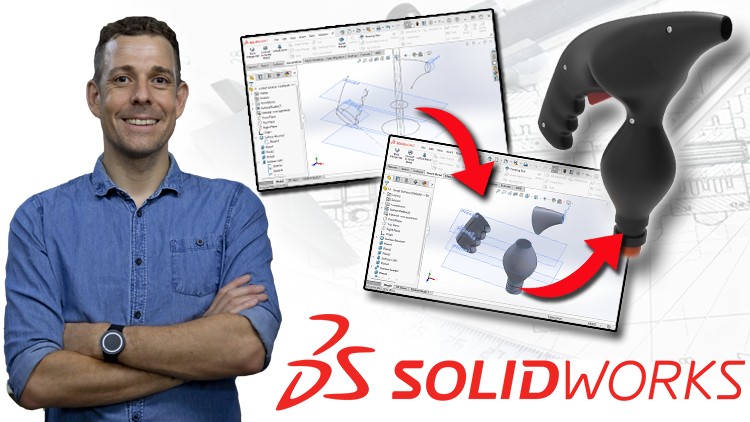
• Joystick
• Bottle
• Shovel
• Candle Holder
• Bowl
• Additional advanced shapes requiring curvature control
5. Complete Surfacing Project — Vintage Airplane
You’ll combine all major surfacing tools to build a polished, complex model from scratch.
This project strengthens your workflow, problem-solving, and confidence.
6. Full CSWPA-SU Exam Preparation
• Exam-style modeling
• Time-saving workflows
• Curve strategy planning
• Fixing broken geometry
• Sample exam + full video tutorial
• “Secret exam tricks” and common mistakes to avoid
By the End of This Course, You Will:
• Use all SolidWorks surfacing tools with confidence
• Build smooth, complex, organic, and freeform shapes
• Fix broken surfaces and solve advanced modeling problems
• Combine multiple surfaces into complete, production-ready solids
• Design real products from scratch (consumer products, tools, etc.)
• Be fully prepared to pass the CSWPA-SU exam
• Think like a surfacing designer, not just a tool user
• Add professional surfacing projects to your portfolio
• Start applying for surfacing or product-design roles
• Confidently list surfacing skills on your résumé
Why Learn From Me?
• Master’s degree in Mechanical Engineering
• SolidWorks Certified Professional (CSWP)
• 5+ years industry experience designing real machinery
• Experience in SolidWorks, CATIA, and AutoCAD
• 48000+ students across 12 engineering courses
• Average instructor rating: 4.5 out of 5
I teach surfacing the way professionals actually use it — clear, structured, practical, and focused on real results.
What Students Say:
★★★★★ “I have a lot of Solidworks experience but never really with surface modelling. I think the best way to take this class is to follow the lessons with Solidworks open in real time. Was able to pass the CSWPA for Surfacing exam first try after taking this course and a little bit of practice.” – Andrew
★★★★★ “As someone who has been using Solidworks for close to ten years without a lot of experience in surfacing, I thought the course was great. Alen walks you through all the surfacing features, step by step and explains the function of almost every option within a feature. The real world examples were helpful, as well. I highly recommend the course.” – Jovan
★★★★★ “Very good course. I can only recommend. Great pronunciation, great topics, error-free construction. Thanks for the course! I now know my way around surface models.” – Theodossios
BONUS:
Enroll today and receive lifetime personal support for any surfacing questions or project challenges.
30-DAY MONEY-BACK GUARANTEE
Try the course completely risk-free.
If it doesn’t help you transform your surfacing skills, Udemy will refund your purchase instantly.
You have nothing to lose, and a professional surfacing skillset to gain.
Click “Add to Cart” and start mastering SolidWorks Surfacing today.